Read the original article in Japanese
English adaptation of an April 2026 Japanese article. It describes the author's local workflow and server-specific helper; it is not a universal WordPress command.
Writing every article from scratch inside wp-admin works, but I found it difficult to keep outlines, revisions, experiments, and reusable templates organized there. I switched to preparing the main text locally and using WP-CLI to create a WordPress draft when the content was ready to review.
The biggest improvement was separating writing from publishing.
Why I prefer local writing
The original article contrasted these two approaches:
| Work | Write entirely in wp-admin | Write locally, then import a draft |
|---|---|---|
| Preserve outlines and exploration | Less convenient for my process | Easier |
| Work with AI-assisted revisions | More cumbersome | Easier to compare changes |
| Prepare several posts in parallel | More difficult | Files can be organized by article |
| Finish a detailed visual layout | Strong in the editor | Still use wp-admin for final adjustments |
This table describes the author's workflow preference, not benchmarked performance.
The local approach is especially attractive if you already collect ideas in Obsidian or another notes app, keep reusable article structures, or want to review differences between drafts.
The workflow
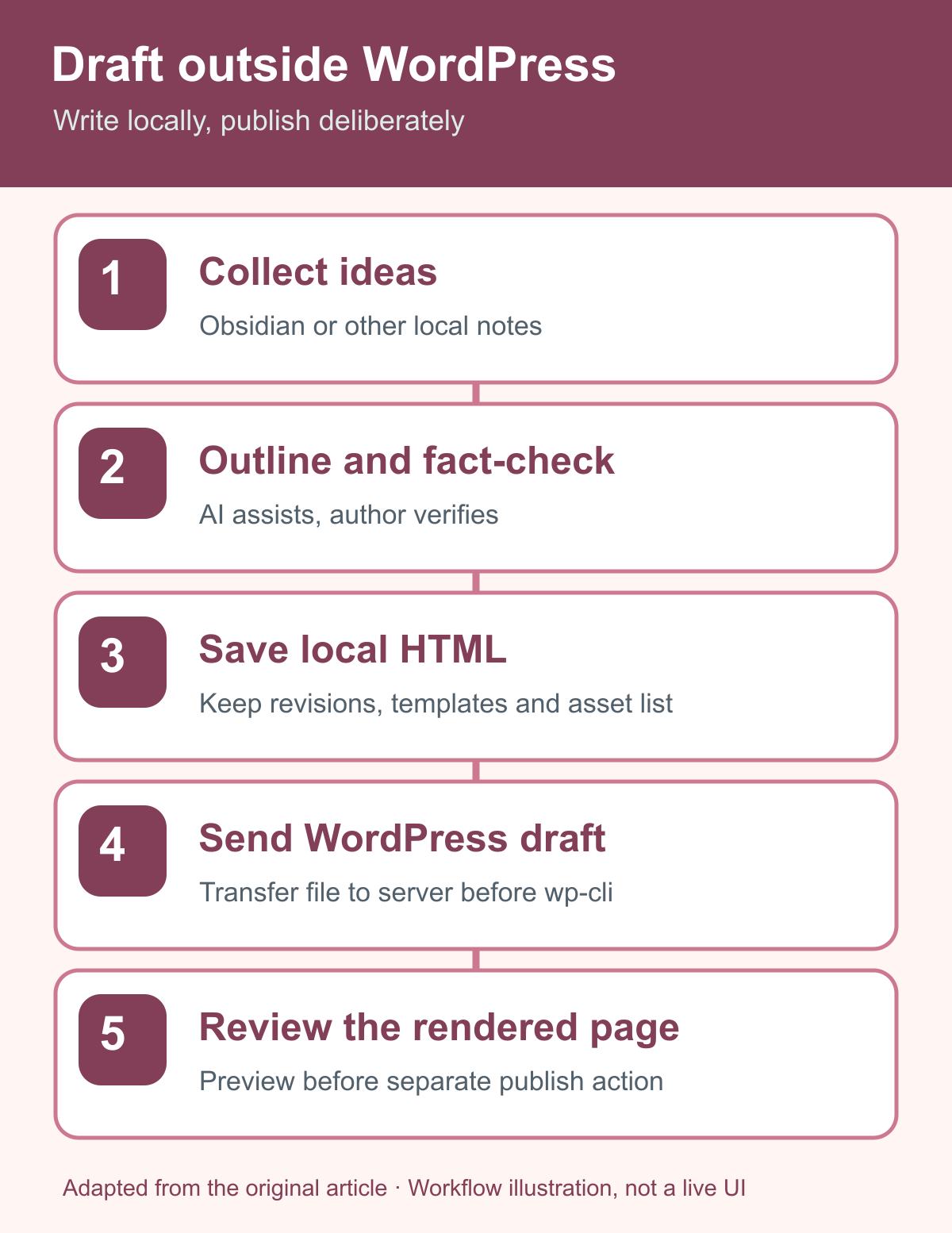
My workflow used four main steps:
- Save ideas and outlines in Obsidian or local notes.
- Work with an AI assistant to prepare the outline or revise the article body.
- Save the approved material as a local HTML file.
- Create a WordPress draft using WP-CLI; inspect and adjust it in
wp-adminbefore any release.
On my configured server I used a small custom helper:
~/bin/ichigoro-new-draft "Article title" /tmp/post-content.html
Important: ichigoro-new-draft is a custom script in this environment, not a standard WP-CLI subcommand. The file must exist in a location accessible to the actual command execution environment. The path above illustrates that server-side use.
Three practical advantages
1. Better AI-assisted writing
Text files are easy for AI tools and humans to compare. I can separate the task of creating an outline from checking the facts and editing the prose.
The original workflow was to preserve article ideas in Obsidian, prepare a structure with AI, draft the body locally, then submit the result as a WordPress draft. The AI's output still needs fact-checking and editorial review.
2. Reusable article structures
Local templates can help with informational posts, product comparisons, and first-hand reviews. A template should structure a genuine story or evidence-based explanation, not invent the experience or the evidence.
A file-based workflow avoids rebuilding the same headings and markup from nothing for each post.
3. Drafts and rejected ideas remain available
Working files can preserve earlier directions, abandoned topics, and revisions that may be useful later. In my experience, that context is easier to retrieve outside the WordPress editor.
What is the minimum setup?
You need:
- A place to write article content locally.
- A permitted means of creating a WordPress draft.
- A prepublication preview and validation procedure.
For my site, those were Obsidian, local HTML, WP-CLI, and final inspection in wp-admin.
There is no need to begin with a complicated publishing platform.
Two problems I encountered
The local file did not exist on the remote server
I initially treated local and server paths as though they referred to the same filesystem. They do not.
You can either transfer the file before running a remote draft command or deliberately design a supported stdin/transfer mechanism. A wrapper can make that process less error-prone, but it must still check the right path.
The shared server's default WP-CLI was outdated
The server-provided WP-CLI was old for the environment I wanted to manage. I chose a separate WP-CLI 2.12.0 installation. That is a historical fact from my setup, not an instruction to pin every installation to that version forever.
Common publishing mistakes
Skipping a local preview. Tables, images, and line breaks may already be awkward before WordPress adds theme styles.
Leaving filesystem image paths in a post. Browser-visible images should use accessible media URLs, not a path meaningful only on the Mac.
Confusing draft creation with publication. An imported draft still needs the relevant editorial checks and human release decision.
Treating successful CLI output as a layout test. Inspect the actual WordPress preview, including phone width.
The local workflow also makes it easier to review headings, identify where a useful explanatory figure belongs, and refine alt text before release. That is a process advantage, not evidence of improved search rankings.
When I would not use it
If you publish infrequently, prefer visually arranging every block as you write, or are not comfortable with SSH and WP-CLI, the WordPress editor may be simpler. You can still prepare the text locally and paste it into the editor manually.
FAQ
Can I write in Markdown? Yes, as an intermediate format. Convert it to the final markup your WordPress setup expects before importing.
What about heavily illustrated posts? Use local preparation for the source and finish detailed layout in the WordPress preview where useful.
What is the main benefit? Drafting and publication become separate, inspectable stages.
For the associated server setup, see Mac mini, SSH and WP-CLI on Xserver and the Codex draft workflow.